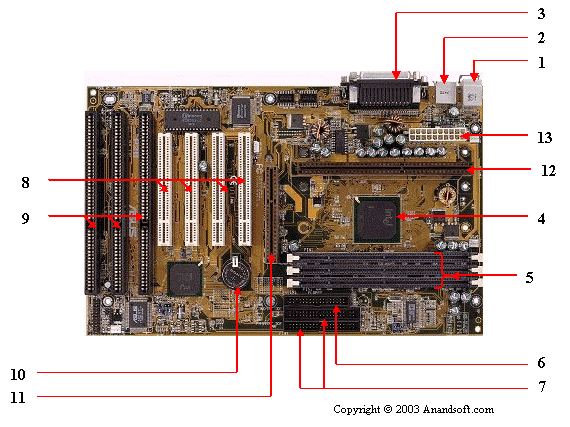
1. Mouse & keyboard: Keyboard Connectors
are two types basically. All PCs have a Key board port connected
directly to the motherboard. The oldest, but still quite common
type, is a special DIN, and most PCs until recently retained
this style connector. The AT-style keyboard connector is quickly
disappearing, being replaced by the smaller mini DIN PS/2-style
keyboard connector.
You can use an AT-style keyboard with a PS/2-style socket
(or the other way around) by using a converter. Although the
AT connector is unique in PCs, the PS/2-style mini-DIN is also
used in more modern PCs for the mouse. Fortunately , most PCs
that use the mini-DIN for both the keyboard and mouse clearly
mark each mini-DIN socket as to its correct use. Some keyboards
have a USB connection, but these are fairly rare compared to
the PS/2 connection keyboards.
2. USB (Universal serial bus): USB is the General-purpose
connection for PC. You can find USB versions of many different
devices, such as mice, keyboards, scanners, cameras, and even
printers. a USB connector's distinctive rectangular shape makes
it easily recognizable.
USB has a number of features
that makes it particularly popular on PCs. First, USB devices
are hot swappable. You can insert or remove them without restarting
your system.
3. Parallel port: Most printers use a special connector
called a parallel port. Parallel port carry data on more than
one wire, as opposed to the serial port, which uses only one
wire. Parallel ports use a 25-pin female DB connector. Parallel
ports are directly supported by the motherboard through a direct
connection or through a dangle.
4. CPU Chip : The central processing unit,
also called the microprocessor performs all the calculations
that take place inside a pc. CPUs come in Variety of shapes
and sizes.
Modern CPUs generate a lot of heat and thus require a
cooling fan or heat sink. The cooling device (such as a cooling
fan) is removable, although some CPU manufactures sell the CPU
with a fan permanently attached.
5. RAM slots: Random-Access Memory (RAM) stores programs
and data currently being used by the CPU. RAM is measured in
units called bytes. RAM has been packaged in many different
ways. The most current package is called a 168-pin DIMM (Dual
Inline Memory module).
6. Floppy controller: The floppy drive connects to
the computer via a 34-pin ribbon cable, which in
turn connects to the motherboard. A floppy controller
is one that is used to control the floppy drive.
7. IDE controller: Industry standards define two common
types of hard drives: EIDE and SCSI. Majority of the PCs
use EIDE drives. SCSI drives show up in high end PCs such as
network servers or graphical workstations. The EIDE drive
connects to the hard drive via a 2-inch-wide, 40-pin ribbon
cable, which in turn connects to the motherboard.
IDE controller is responsible for controlling the hard
drive.
8. PCI slot: Intel introduced the Peripheral
component interconnect bus protocol. The PCI bus is
used to connect I/O devices (such as NIC or RAID controllers)
to the main logic of the computer. PCI bus has replaced the
ISA bus.
9. ISA slot: (Industry Standard Architecture)
It is the standard architecture of the Expansion bus. Motherboard
may contain some slots to connect ISA compatible cards.
10. CMOS Battery: To provide CMOS with the power when
the computer is turned off all motherboards comes with a battery.
These batteries mount on the motherboard in one of three
ways: the obsolete external battery, the most common onboard
battery, and built-in battery.
11. AGP slot: If you have a modern motherboard,
you will almost certainly notice a single connector that looks
like a PCI slot, but is slightly shorter and usually brown.
You also probably have a video card inserted into this slot.
This is an Advanced Graphics Port (AGP) slot.
12. CPU slot: To install the CPU, just slide
it straight down into the slot. Special notches in the slot
make it impossible to install them incorrectly. So remember
if it does not go easily, it is probably not correct. Be sure
to plug in the CPU fan's power.
13. Power supply plug in: The Power supply, as its
name implies, provides the necessary electrical power to make
the pc operate. the power supply takes standard 110-V AC power
and converts into 12-Volt, 5-Volt, and 3.3-Volt DC power.
Reputed Computer Manufacturers:
Manufacturers offering PCs with branded motherboards include
Acer, Dell, HP, Lenovo, and others.
Dell Make: The range of computers offered include
All-in-one models, high performance business grade computers,
notebooks, mini notebooks, high performance gaming computers,
and hardware/software accessories. Dell makes use of custom
made motherboards. Please visit Dell site at www.dell.com for
more information.
Lenovo make: The computer products offered by Lenovo
include Laptops & netbooks, Desktops & all-in-ones,
Workstations, and Servers. The company offers solutions for
Home or home office, small/large businesses, educational institutes,
healthcare, etc.
Acer Make: Acer brand is well known for its notebook
and desktop computers. The company, like Dell, offers All-in-one
series up to more powerful gaming computers. Acer too, provides
motherboards that are custom made. Please visit Acer website
www.acer.com for more information.
Retail Stores for Computers and Accessories:
If one intends to buy a computer or any components, it is
recommended to search for the best offers by comparing various
brands. Given below are some of the reputed computer & electronics
retail stores. Almost all the retailers offers online sales.
J & R: Established in the year 1971, they
offer a wide variety of desktop computers, notebook computers
and accessories. Customers may buy desktops or notebooks at
JR.com by either visiting their stores or online. Visit company
website www.jr.com for more information.
CompUSA: A retail stores chain. They offer
computers and accessories through stores as well as online sales.
Website: compusa.com
Frys: Again, a retail stores specializing
in electronics, components, and computers. Website: frys.com
Circuit City: One of the biggest retail
stores chain that offers computers and electronic products.
Website: circuitcity.com
Best Buy: They specialize in TVs, computers,
computer accessories, cameras and others. Visit the company
website at www.bestbuy.com
Radio Shack: They specialize in electronic
components, and assemblies. They also offer desktop and laptop
computers and computer accessories. website: radioshack.com
Tiger Direct: Another stores that offer
both brick and mortar stores and online stores. The product
range include computers, mobile phones, and other electronic
products. Website tigerdirect.com
Please forward your suggestion or comments to the webmaster
at tutorialsweb.com